Complete double-entry bookkeeping for New Zealand and Australian businesses (and, with your own tax rate, anywhere else), from a sole trader or a family trust to a company with staff, jobs and stock. Pay once. Your books live in a file on your own computer, and you keep access to every invoice and account for as long as you like.
Request a trial key with your name, company and email, download, enter the key. Everything you enter is kept when you buy.
US$149, paid once, with 12 months of updates. A mid-level cloud plan costs more than that in its first four months and keeps charging every month after.
The program and your data file stay on your computer. Open last decade's invoices without paying anyone, including after the business has closed and you still have to keep the records.
No online account to be phished, no shared server holding thousands of businesses' books, no outage that locks you out at GST time. Automatic backups and dated save-as copies are under your control.
Unlimited job costing with templates, labour and materials; quotes from a costing; stock levels and valuation; retail, trade and discount price levels per customer. No pricey add-ons.
Invoice overseas customers and pay overseas suppliers in their currency, hold foreign-currency bank accounts, and let REX post the exchange gains and losses. On cloud packages this is a top-tier feature; here it is in the one price.
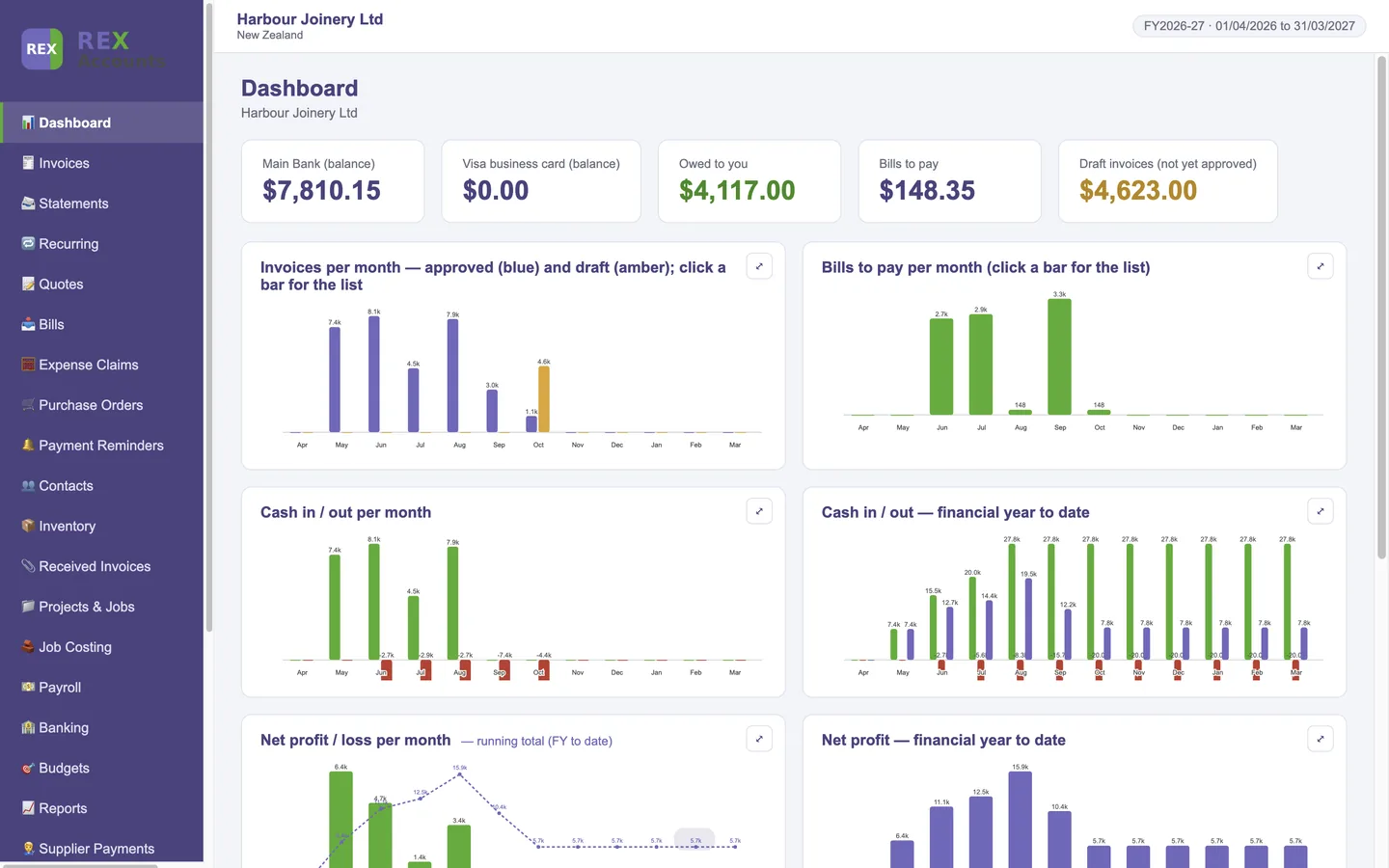
A clear dashboard with full-screen graphs, plain-English screens, dd/mm/yyyy dates, a setup wizard, and a manual with a screenshot of every screen. Simple enough for a sole trader or to manage your finances in retirement; complete enough for a company with staff, jobs and stock.
No internet connection is needed to open your books, so they are there at GST time, on a plane, or during an outage. Nothing is uploaded, and there is no online account to log in to.
Year-end export writes every ledger, journal, report and register to PDF and a multi-tab spreadsheet. Your accountant needs no login and pays nothing.
Competitor figures are the standard (non-promotional) prices published on competitor websites on 12 October 2026, excluding GST and before any add-ons; they change from time to time, so check the current price. Five years is simply the monthly or yearly price multiplied out. REX Accounts is sold in US dollars; the exact amount in your currency, plus GST, is shown at checkout.
| What you get | REX Accounts | Typical cloud package |
|---|---|---|
| Cost and ownership | ||
| Pay once, use for good | ✓ | ✗ monthly fee |
| Access to your records after you stop paying | ✓ | ✗ |
| Unlimited invoices, bills and bank accounts on the one price | ✓ | $ capped on entry plans |
| All your company's computers, Windows and Mac, one key | ✓ | ✓ |
| Multi-currency invoices, bills and bank accounts with exchange gains and losses posted | ✓ | $ higher tiers |
| Where your data lives | ||
| Data stays on your own computer, nothing uploaded | ✓ | ✗ |
| Works with no internet connection | ✓ | ✗ |
| Automatic backups you hold yourself, restore with one click | ✓ | ✗ |
| Save a dated copy of the books and roll back to it | ✓ | ✗ |
| No online account that can be hacked, phished or breached | ✓ | ✗ |
| Access from a phone or someone else's computer | ✗ | ✓ |
| Bookkeeping | ||
| Double-entry ledger, Profit & Loss, Balance Sheet, Trial Balance, Cash Flow, aged debtors and creditors | ✓ | ✓ |
| Invoices, quotes, recurring invoices, statements, payment reminders | ✓ | ✓ |
| Bills, purchase orders, expense claims with GST worked out | ✓ | ✓ limited on entry plans |
| Bank statement import (CSV / QIF) and reconciliation | ✓ | ✓ bank feeds |
| Tax figures: NZ GST101A, Australian 10% GST, or your own tax name and rate anywhere else | ✓ | ✓ |
| Files the return electronically for you | ✗ copy figures into myIR / ATO | ✓ some tiers |
| Jobs, stock and more | ||
| Job costing: templates, labour and materials, quote from a costing, unlimited jobs | ✓ | $ add-on or higher tier |
| Stock levels, valuation and movements | ✓ | $ add-on |
| Price levels (retail, trade, discount levels) per customer | ✓ | $ |
| Projects, timesheets, budgets vs actual, Report Writer | ✓ | $ higher tiers |
| Supplier invoices and receipts filed by financial year, named by supplier | ✓ | ✓ attached to the bill |
| Expense receipts: photo-to-PDF import | ✓ | ✓ receipt app, some plans |
| Year-end export of every ledger and report to PDF and spreadsheet for your accountant | ✓ | ✓ accountant needs a login |
| Payroll recording (NZ and AU figures from your payroll provider, ACC levy) | ✓ records, does not calculate | $ per employee |
| Supplier and contractor payment reports (ATO TPAR / NZ) | ✓ | ✓ |
| User logins, roles and two-factor sign-in | ✓ | ✓ |
"Typical cloud package" summarises the published entry and mid-level plans of the main cloud accounting packages as at October 2026; details vary by plan and change from time to time. REX Accounts does not do bank feeds or electronic filing; see the FAQ for what it does not do.
Invoices, quotes, bills and purchase orders with approve-then-convert. Enter line prices GST inclusive or exclusive, see the GST % per line, bold subtotal and total. Copy any invoice or bill to a new draft.
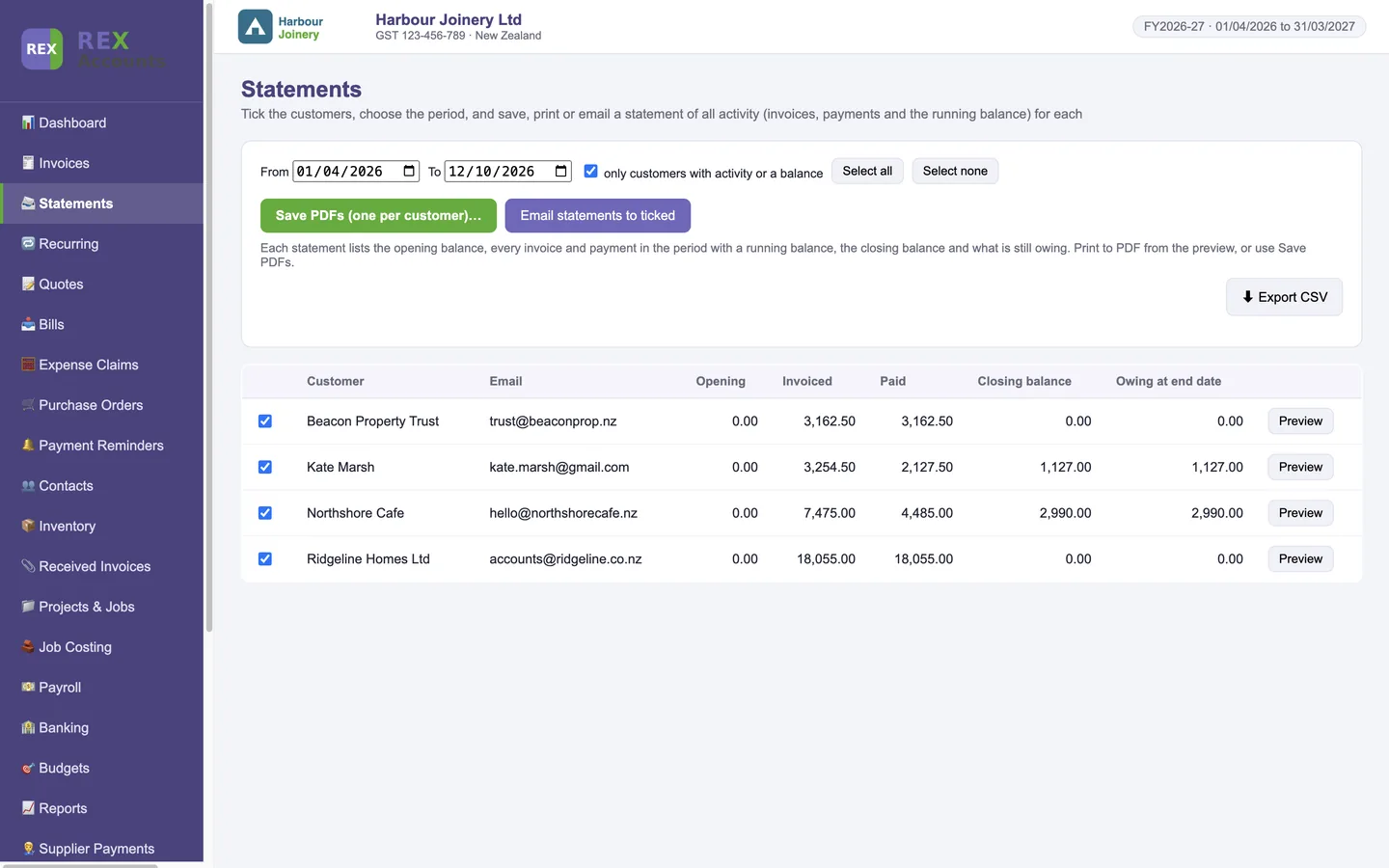
Tick the customers, choose the period, and save, print or email a statement of all activity with a running balance and what is owing as at the statement date.
Allocate one payment to one invoice or many, across customers. Email overdue reminders in one click. Recurring invoices generate themselves on schedule.
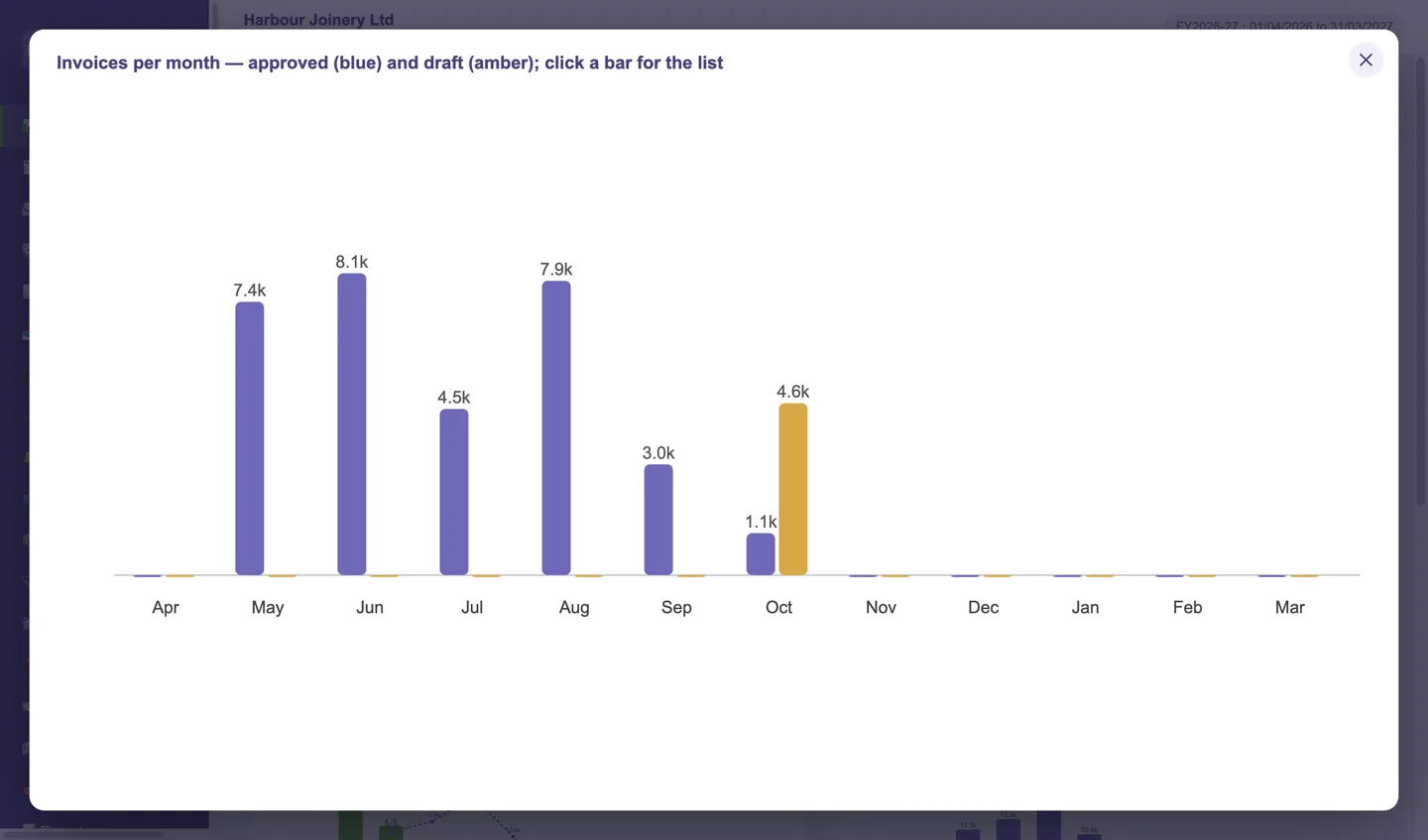
Bank balances, what you are owed and what you owe, and six clickable graphs for the financial year: invoices (approved and draft), bills, cash in and out, net profit and running totals. Open any graph full screen.
Any number of bank, credit-card and cash accounts. Import CSV or QIF statements from your bank, categorise with the GST split worked out, match payments, and watch the bank tile agree with your statement.
New Zealand GST101A figures box by box, Australian 10% GST, or, for any other country, the tax name and rate you set (VAT, sales tax) with a tax summary for the period. You copy the figures into your return.
Profit & Loss, Balance Sheet, Trial Balance, Cash Flow, aged receivables and payables, budget vs actual, audit log; plus a Report Writer for your own lists and summaries. Every list and report exports to CSV.
Unlimited jobs. Costing templates with labour and material lines, cost a job, turn it into a quote or invoice, record time, and see hours, costs and profit per job.
Stock that updates as you buy and sell, valuation and movement reports, and price levels (sale, retail, trade, discount levels you can rename or add) applied automatically by customer.
Attach a PDF or photograph a receipt; the supplier, number, date and total are read from it. Files are stored inside REX and in a searchable folder per financial year, named by supplier.
Expense claims with who paid and GST worked out. Record pay runs from your payroll provider's figures (NZ PAYE, KiwiSaver and ACC levy; Australian PAYG and super) so wages post correctly.
Tick the payees and get one report per supplier or contractor for the period, GST apportioned, ready for the ATO's TPAR or your NZ records.
One click writes every ledger, journal, invoice and bill register, report and GST return for the financial year to PDF and a multi-tab spreadsheet for your accountant.
Monthly budgets per account with variance reports, so you can see at a glance how each account is running against plan during the financial year.
Automatic backups on close and hourly; save a named, dated copy of the books at any time and roll back to it. Company name and logo on every screen and every document.
Administrator and staff logins, Google Authenticator two-factor sign-in, admin-only settings, and an audit log of who changed what.
Import your contacts and chart of accounts from their CSV exports; bring bank history in from your bank's files. A three-step wizard has a new business running in minutes.
Customers, suppliers and bank accounts in any currency; invoices and bills raised in theirs at a rate you set, payments at the rate on the day, and exchange gains and losses posted for you. Reports stay in your home currency.
Invoices, quotes, statements and payment reminders save as PDF, print, or email from the program, with your company name and logo on every document.
No bank feeds, no electronic filing, no wage calculation and no live exchange-rate feed. If you need those, a cloud package may suit you better; see the FAQ.
Assign a customer or supplier a currency and every invoice, quote, bill and purchase order for them is raised in it, with the rate suggested from your table and editable on the document. The PDF shows the currency code.
Every posting is converted at the document's rate, so Profit and Loss, the Balance Sheet and your GST figures stay in your home currency. Lists and statements show the document currency; aged reports show both.
Record the payment at the rate on the day. The bank is posted at that rate, the invoice cleared at the rate it was raised, and the difference goes to Foreign Exchange Gain/Loss automatically.
Hold a USD or AUD account, import its statement, and categorise lines as usual; they are posted at your table rate. Rates are yours to set, with no live feed and no surprise revaluations.
Access is usually read-only for a short grace period and then closed. New Zealand and Australian businesses must keep records for seven years, so many people keep paying for a package they no longer use just to be able to open old invoices. With REX, the program and the data file are yours; you can open your 2026 books in 2036 without paying anyone.
REX Accounts is US$149 paid once, with 12 months of free updates. A mid-level Xero plan in New Zealand is NZ$89 a month, over NZ$1,000 a year, every year. Even the cheapest cloud plans cost more in their first year than REX costs for good. See the sample comparisons above.
It does not connect to bank feeds (you import a statement file from internet banking instead), does not file GST or BAS returns electronically (you copy the figures into myIR or the ATO portal), does not calculate wages or PAYE (it records the figures from your payroll provider). If you need those every day, use a payroll system or, alternatively, a cloud package, which may suit you better; we would rather say so than sell you the wrong thing.
Yes. REX Accounts is built for New Zealand (15% GST, GST101A figures) and Australia (10% GST), and for any other country you choose "Other" in Settings, name your tax (VAT, sales tax, GST) and set its rate. Invoices, reports and a tax summary then use that name and rate. Return layouts are provided for New Zealand only; elsewhere you copy the summary figures into your own return. Foreign-currency customers, suppliers and bank accounts are supported, with exchange gains and losses posted automatically. REX Paperworks and REX Visio2DXF have no country settings.
Yes, at no charge to them. Send them a copy of your data file, or use the year-end export, which writes every ledger, journal, report and register for the financial year to PDF and a multi-tab spreadsheet. Many accountants prefer that to logging in to yet another cloud system.
By buying you agree to the Licence Agreement and Terms of Sale. Third-party components are listed in each product's NOTICES file (Manuals page).